
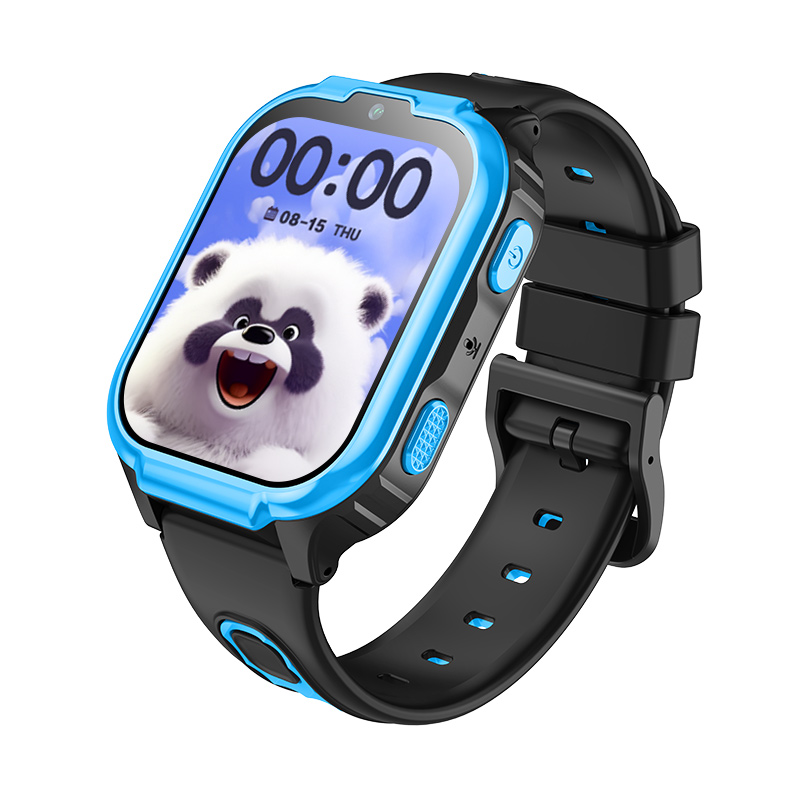


The D55B-A9C kids smartwatch is a Green-Gps compatible device designed for safe, everyday wear and reliable connectivity. With 4G cellular support, a bright 1.83-inch display (240x280 resolution) and responsive controls, the D55B-A9C brings smooth performance and a user-friendly interface to parents and caregivers using the Green-Gps platform. Its compact, child-focused form factor and long-standby low-power battery make it a practical choice for supervised communication and on-the-go monitoring via Green-Gps's dashboard.
The watch is built for clear interaction and dependable operation: 1GB of RAM and 16GB of internal storage keep apps responsive and allow room for media and app data, while a rotating navigation button provides quick, tactile control for children. When integrated with Green-Gps, the D55B-A9C pairs its 4G connectivity and device status reports with Green-Gps’s telemetry, reporting, and alerting features to deliver an improved, family-oriented tracking and management experience.
Key Highlights
- Green-Gps compatible — integrates with Green-Gps dashboards for centralized device management and monitoring.
- 4G cellular connectivity for reliable data and voice links between the watch and Green-Gps services.
- Bright 1.83-inch display (240x280) that delivers clear, easy-to-read screens for children.
- Smooth operation with 1GB RAM and 16GB internal storage for apps, media, and system data.
- Low power consumption design and long standby battery life to reduce frequent charging.
- Rotating button navigation that lets kids turn pages and change UI styles with simple gestures.
- Comfortable, wearable design intended for daily child use and interactive features.
How It Works with Green-Gps
When the D55B-A9C is registered on Green-Gps, the watch’s cellular telemetry and system status are available in Green-Gps’s interface for real-time monitoring, alerts, and reporting. Green-Gps ingests the device’s network connectivity and operational data over 4G and presents it alongside other trackers. Depending on the device’s built-in location capabilities or network-assisted location reporting, Green-Gps can provide live location updates and historical device activity to parents and administrators.
- Real-time connectivity and telemetry updates via 4G to Green-Gps dashboards
- Device status and battery/standby reporting to help manage uptime and charging alerts
- User interaction events (button presses, app usage) available as status markers in Green-Gps where supported
- Custom alerts and notifications for low battery, network loss, and device offline state
- Green-Gps support for additional inputs (e.g., ignition/immobilizer or BLE sensors) applies to compatible devices; the D55B-A9C integrates where equivalent data is provided
Technical Overview
| Model | D55B-A9C |
|---|---|
| Form Factor | 4G kids smartwatch — compact, wearable design for daily use |
| Display | 1.83-inch, 240 x 280 resolution |
| Memory | 1 GB RAM |
| Storage | 16 GB internal storage |
| Connectivity | 4G cellular |
| Power & Battery | Low power consumption design for extended standby operation |
| Controls / Interfaces | Rotating navigation button (turn to change pages; double press to switch UI styles) |
| Intended Use | Child communication, daily wearable smartwatch functions, supervised monitoring |
Use Cases
- Parent-child communication — reliable voice/data connection via 4G for calls, messages, and status updates when used with Green-Gps’s device management.
- Daily supervision and convenience — quick access to interactive apps and clear screen navigation for school-days and activities.
- Long-duration outings — low power consumption and long standby help reduce interruptions during travel and day trips.
- Device fleet of wearable trackers — manage multiple child devices from a single Green-Gps account for daycare or school groups requiring centralized oversight.
- Activity and event logging — monitor device usage and connectivity patterns through Green-Gps’s reporting tools to build simple telemetry histories.
Why Choose This Tracker with Green-Gps
The D55B-A9C combines child-first ergonomics with dependable 4G connectivity and a straightforward control set that families and small organizations can manage using Green-Gps. Its hardware profile — a crisp 1.83-inch display, adequate memory and storage, and a long-standby battery — supports everyday communication and interactive smartwatch functions while Green-Gps handles aggregation, alerting, and reporting. For parents and administrators seeking a Green-Gps compatible wearable for supervised monitoring, the D55B-A9C offers practical value: reliable connectivity, easy navigation for children, and integration into Green-Gps’s telemetry and device management workflows.
Note on expanded features: Green-Gps’s platform also supports advanced telemetry, GPS tracker workflows, fleet management dashboards, ignition/immobilizer inputs, fuel monitoring and Bluetooth sensors for compatible devices. The D55B-A9C focuses on child-oriented connectivity and interaction; where additional telemetry (such as location services or external sensors) is available from the device, Green-Gps will incorporate that data into its real-time tracking and reporting tools. For deployments that require vehicle-grade inputs like ignition or immobilizer control, Green-Gps can manage those capabilities with appropriate compatible trackers.
Set Up D55B-A9C
To set the tracker send the following commands by SMS messages, the sample setup the device password is SHqDNd, this password is the default
-
Factory reset
pw,SHqDNd,factory# -
Set the time zone UTC-0
pw,SHqDNd,lz,0,0# -
Check the MCC and MNC
pw,SHqDNd,imsi# -
Set the operator APN where xxx is MCC and yy is MNC
pw,SHqDNd,{{apn}},{{apnu}},{{apnp}},xxxyy# -
Set GPRS server
pw,SHqDNd.ip,54.85.159.138,8888# -
Set update interval 300 seconds
pwSHqDNd,upload,300#
To check settings pw,SHqDNd,ts#